Services
Flutter app development for iOS and Android
We build Flutter apps for iOS and Android from one Dart codebase, together with the API, the database and the admin panel behind them. Flutter draws every screen itself, so a custom design looks the same on every phone.
What is included
One Dart codebase
A single Flutter project that builds both the iOS app and the Android app, so they launch together and stay in step.
Your design on every phone
Screens built from the prototype you approved. Flutter renders them with its own engine, so they match on both platforms down to the pixel.
The backend
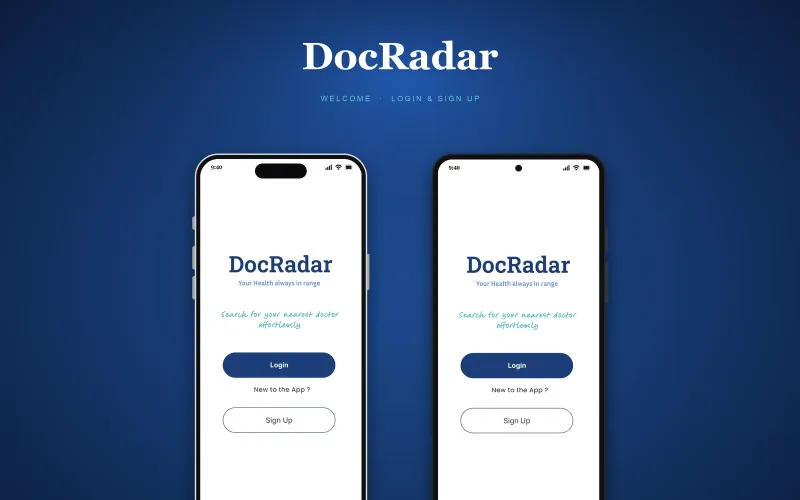
The API, the database, secure sign-in and roles. DocRadar, the Flutter app we shipped, runs on Node.js, Express and MySQL on AWS.
Maps and location
Google Maps and geolocation. DocRadar shows available doctors and facilities near the patient in real time.
In-app payments
Stripe inside the app, for secure payments by more than one method.
Store release
Listings, screenshots, testing tracks and review for the App Store and Google Play, under developer accounts in your name.
- Flutter
- Dart
- Node.js
- Express
- MySQL
- Google Maps
- Stripe
- AWS
Who it is for
Founders with a strong custom design
Flutter draws its own widgets, so a branded interface looks identical on iOS and Android instead of following each platform.
Products that need both stores at launch
One codebase covers iOS and Android, which saves a large part of the build compared with two native apps.
Apps that do not share code with a website
If your website is a separate marketing site, Flutter is a strong fit. If a React web app is part of the plan, we will usually suggest React Native instead.
- A fixed price, agreed after week 1
- You own the code, designs and accounts
- A preview link every week
- 30 days of fixes after launch
How the 8–12 weeks break down
The full process- Week 1
Blueprint
Feature list, screen map and a check that Flutter is the right tool. We list the integrations the app cannot live without and confirm each has a solid Flutter package. The reason for the choice goes into the plan, with a fixed quote.
- Weeks 2–3
Design
One design for both platforms, drawn at phone size and linked into a prototype you can tap through.
- Weeks 4–11
Build
The Flutter app and its backend are built side by side, one slice at a time: sign-in, then the main job of the app, then payments. A fresh preview every Friday.
- Weeks 8–12
Launch
Both stores review an app before it goes public. Launch covers the listings, the testing tracks and the review, then 30 days of fixes.
Is Flutter the right choice for your app?
Pick Flutter when
You want one custom design that looks identical on every phone, and you do not need to share code with a website.
Pick React Native when
Your team writes JavaScript, or a React web app is part of the plan. The app and the website can then share a language and often code.
Go native when
The app runs on one platform and leans hard on it: background work, the file system or Bluetooth hardware.
Let the integrations decide
If a payment provider or a piece of hardware only has an official package for one framework, that can settle the question.
What you have at the end
- The app live in the App Store and Google Play, under developer accounts in your name
- One Flutter codebase for both platforms, which is yours
- The API, the database and the admin panel on a hosting account in your name
- The design files, the store listings and the screenshots
- Analytics and error tracking switched on
- 30 days of fixes after launch
Questions founders ask
Is Flutter good for an MVP?
Yes. One codebase covers iOS and Android, which saves a large part of the build. For the screens most first versions need (lists, forms, maps, chat and payments), Flutter is fast enough that users will not notice which framework you chose.
Flutter or React Native: which should I choose?
Pick Flutter when you want one custom design that looks identical on every phone and there is no website to share code with. If a React web app is part of the plan, React Native is usually the better fit. We make the choice in the blueprint week and write the reason into the plan.
How long does it take to build a Flutter app?
Eight to twelve weeks for most first versions: one week for the blueprint, two for design, then the build and the launch. Eight weeks of building is normal when the app needs a backend as well.
How much does Flutter app development cost?
Projects start from $1,000. The exact price depends on the screens and the integrations. After the blueprint week you get a fixed quote for the whole build, the backend included, agreed before design starts.
Can a Flutter app use maps, payments and push notifications?
Yes. Flutter has mature packages for maps, payments, push notifications, the camera and sign-in with Apple and Google. DocRadar uses Google Maps geolocation and Stripe payments.
Can Flutter build my web app as well?
It can, and it works well for app-like tools behind a login. It is not the right fit for text-heavy pages such as a marketing site or a blog, so those are usually a separate web project.
Which Flutter apps have you built?
DocRadar, a doctor-booking app for iOS and Android with real-time availability, geolocation and in-app payments. It is the one Flutter project on our work page. Our other mobile work is React Native and native Kotlin.
Can my own developers take over the Flutter code later?
Yes. The code is yours from the start. Flutter apps are written in Dart, which is easy to pick up for anyone who knows TypeScript, Java, Kotlin or Swift, though fewer developers arrive already knowing it.
Related guides
All guides- Guide · 6 min readReact Native vs Flutter: which should your startup pick?React Native vs Flutter for a startup's first app: hiring, performance, UI, packages, web reuse and when to go native, with real projects built on each.
- Guide · 11 min readApp store launch checklist: Apple and Google PlayAn app store launch checklist for Apple and Google Play: accounts, listing assets, privacy forms, review times and update release dates, with a PDF to print.
- Guide · 6 min readWeb app or mobile app first: how founders decideWeb app or mobile app first? How to decide from where your users are, what the phone must do, how people find you, and when a PWA is enough to start.